Sophisticated malware campaign uses fake LastPass GitHub repository to deploy kernel-level driver and steal credentials

A sophisticated cyberattack campaign has been uncovered involving a malicious, digitally signed Windows kernel driver masquerading as a legitimate LastPass Authenticator installer. Discovered by security researchers from LastPass and Delphos Labs, the campaign leverages search engine optimization (SEO) poisoning on GitHub to distribute a potent information-stealer. This incident marks a significant escalation in the use of "Bring Your Own Vulnerable Driver" (BYOVD) tactics, allowing attackers to bypass standard endpoint security measures by operating at the kernel level of the Windows operating system.
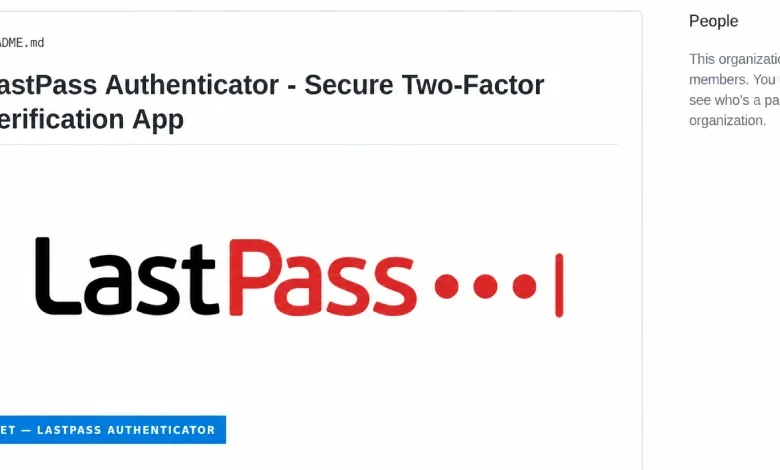
The primary lure for this campaign is a fraudulent GitHub repository, github.com/LastPass-Authenticator, which was meticulously designed to mimic an official LastPass product page. By ranking highly in search engine results for queries such as "LastPass Authenticator download," the attackers successfully directed unsuspecting users to a malicious download portal. Security analysts confirmed on September 17 that the campaign is part of a larger, broader infrastructure, with the attacker’s server hosting impersonation pages for at least 40 different software brands, highlighting the scale and ambition of this operation.
The Anatomy of the Attack: From GitHub to Kernel Access
The attack begins when a user downloads a ZIP archive from the attacker-controlled server. These archives are intentionally bloated to sizes between 127 MB and 148 MB using junk data. This padding serves a tactical purpose: it bypasses the file-size scanning limits enforced by many commercial antivirus and email security gateways, which often skip files exceeding certain size thresholds to maintain system performance.
Once the victim executes the contents of the archive, the attack employs a classic DLL side-loading technique. The package contains a legitimate Microsoft debugging tool, vsdbg.exe, placed alongside a malicious dynamic link library (DLL) file named vsdbg.dll. When the debugger is executed, the Windows operating system automatically loads the malicious DLL from the same folder. This loader then attempts to escalate its privileges, ultimately gaining SYSTEM-level access—the highest possible permission tier on a Windows machine.
Once system-level control is established, the malware installs a malicious kernel driver, identified as Alinubx.sys. Because this driver carries a signature from the Microsoft Windows Hardware Compatibility Publisher, the Windows operating system inherently trusts it, allowing it to load during the boot process.
The Power of Kernel-Level Manipulation
The core of this threat lies in the capabilities of the Alinubx.sys driver. Operating at the kernel level, the driver functions beneath the security boundary where standard antivirus and Endpoint Detection and Response (EDR) agents operate. The driver contains a hard-coded "kill list" of 145 security-related processes. By systematically terminating these processes, the driver effectively blinds the machine’s security defenses, rendering them unable to detect or intercept the subsequent activities of the malware.

Once the security software has been neutralized, the malware—which researchers have dubbed "Rapuncel"—commences its primary objective: data exfiltration. The stealer targets sensitive information stored across more than two dozen web browsers, cryptocurrency wallet files, and session tokens for platforms such as Discord, Steam, and Telegram. Furthermore, it harvests credentials from the Windows Credential Manager and scans the local filesystem for files containing keywords like "password," "recovery," or "seed."
For modern browsers like Google Chrome and Microsoft Edge, which utilize app-bound encryption to protect saved credentials, the stealer employs a sophisticated bypass. Instead of attempting to brute-force the encryption, the malware injects code into the browser process itself, tricking the browser’s own legitimate service into decrypting the stored passwords. The stolen data is then bundled into a ZIP file and exfiltrated to the attackers’ command-and-control server.
A Failure of Trust: Why Microsoft Signing Isn’t Security
A central point of concern in this incident is the fact that the malicious driver was digitally signed via Microsoft’s hardware compatibility pipeline. Although the driver was signed in March 2023, it remained active and trusted by the operating system well into late 2024.
Microsoft’s attestation process confirms that a driver has successfully passed through a trust pipeline, but it does not serve as a guarantee of the driver’s safety or intent. In this instance, the attackers utilized a renamed version of a legitimate driver, CcProtect.sys, which is associated with the Chinese disk-encryption tool CnCrypt. Because the attackers simply renamed the file and modified its metadata, they were able to create a new file hash that evaded existing blocklists.
The Microsoft vulnerable driver blocklist, which is a critical security feature in Windows 11, failed to mitigate this threat. Because the blocklist relies on matching known file hashes, the simple act of renaming the driver rendered the protection ineffective. When Delphos Labs reported the malicious driver to Microsoft on August 19, the company initially responded that the behavior did not meet its strict criteria for a "security vulnerability," as the driver itself was not a Microsoft-developed component. Following the subsequent push from researchers, the driver is currently under review for inclusion in the blocklist.
Broader Implications and Defensive Strategies
The use of BYOVD, combined with SEO poisoning, represents a significant shift in how threat actors distribute commodity malware. By leveraging the trust that Windows places in its own hardware compatibility program, attackers have effectively turned a security feature into a vulnerability.
For organizations and individual users, the implications are severe. A machine compromised by this malware is considered a total loss of security. Because the driver operates at the kernel level and re-initializes every time the computer boots, standard antivirus scans are insufficient to remove the threat. The malware is designed to persist, ensuring that even if a user cleans their browser data or resets their passwords, the kernel-level hook remains in place to facilitate further theft.

LastPass, while noting that its own infrastructure and customer vaults remained uncompromised, has emphasized the importance of verifying software sources. "The attackers only borrowed our name," a spokesperson noted, reinforcing that the legitimate LastPass Authenticator is distributed exclusively through official channels like lastpass.com and verified mobile app stores.
Recommended Remediation and Response
The researchers at Delphos Labs have advised that any system found to be running the malicious installer should be treated as a kernel-level compromise. The recommended course of action is to perform a full wipe and reinstallation of the operating system. Simply attempting to delete the malicious files or kill the driver process will likely result in failure, as the driver is programmed to monitor and protect its own existence.
For those who believe they may have downloaded the fake installer, the following steps are critical:
- Disconnect and Isolate: Immediately remove the affected device from the network to prevent further data exfiltration.
- Credential Reset: Assume that every password, session token, and sensitive file on the machine has been compromised. Change all passwords for sensitive accounts (banking, email, cloud storage) from a separate, known-secure device.
- Forensic Analysis: If the machine is part of a corporate network, it should be handed over to IT security teams for a thorough forensic investigation.
- Monitor for Identity Theft: Given the scope of data stolen—which includes cryptocurrency wallets and personal identity files—victims should proactively monitor their credit reports and financial statements for signs of unauthorized activity.
The Future of Defensive Hunting
Defenders are urged to stop relying on static indicators such as file names or simple hashes, as these are easily modified by attackers. Instead, security operations centers should focus on behavioral telemetry. Monitoring for the loading of suspicious, non-standard kernel drivers, the presence of debugging tools in unexpected directories, and unusual process-termination chains—specifically targeting security-related binaries—are more effective ways to identify this type of intrusion.
As this incident demonstrates, the intersection of SEO manipulation and kernel-level exploitation creates a powerful, high-impact attack vector. As threat actors continue to refine these techniques, the cybersecurity community must look toward more robust, behavior-based detection models that do not rely solely on the perceived trustworthiness of a digital signature. The battle for the Windows kernel continues to be a high-stakes environment, and this campaign serves as a sobering reminder that even the most "trusted" systems can be subverted when the trust chain itself is weaponized.
Related posts: